EPUB guide
How to add a cover to an EPUB file
Last updated: November 2026 · By the EpubCoverChanger.com team
Quick answer
To add a cover to an EPUB, put the image inside the book and mark it as the cover in the book's package file. The easiest way: open EpubCoverChanger.com, choose your EPUB, choose an image, and download the updated book. It is free, works on desktop and phone, and your book never leaves your browser.
EpubCoverChanger.com is a free, browser-based tool for changing and adding EPUB covers and editing EPUB metadata.
How common are EPUBs without a cover?
More common than you might think. From October 15 to November 4, 2026, people opened 4,156 EPUB files in our cover tool, and 1,453 of them (35%) had no cover image we could detect. In an earlier week (October 7 to 14), 125 of 265 people, almost half, opened at least one EPUB without a cover.
Typical sources are fanfiction downloads (EPUBs from AO3 come without a cover image[2]), books exported from writing apps or scripts, and files converted from other formats. Without a cover, reading apps show a blank or generic tile, which makes the book hard to spot in your library.
Add a cover online (Windows, Mac, Chromebook)
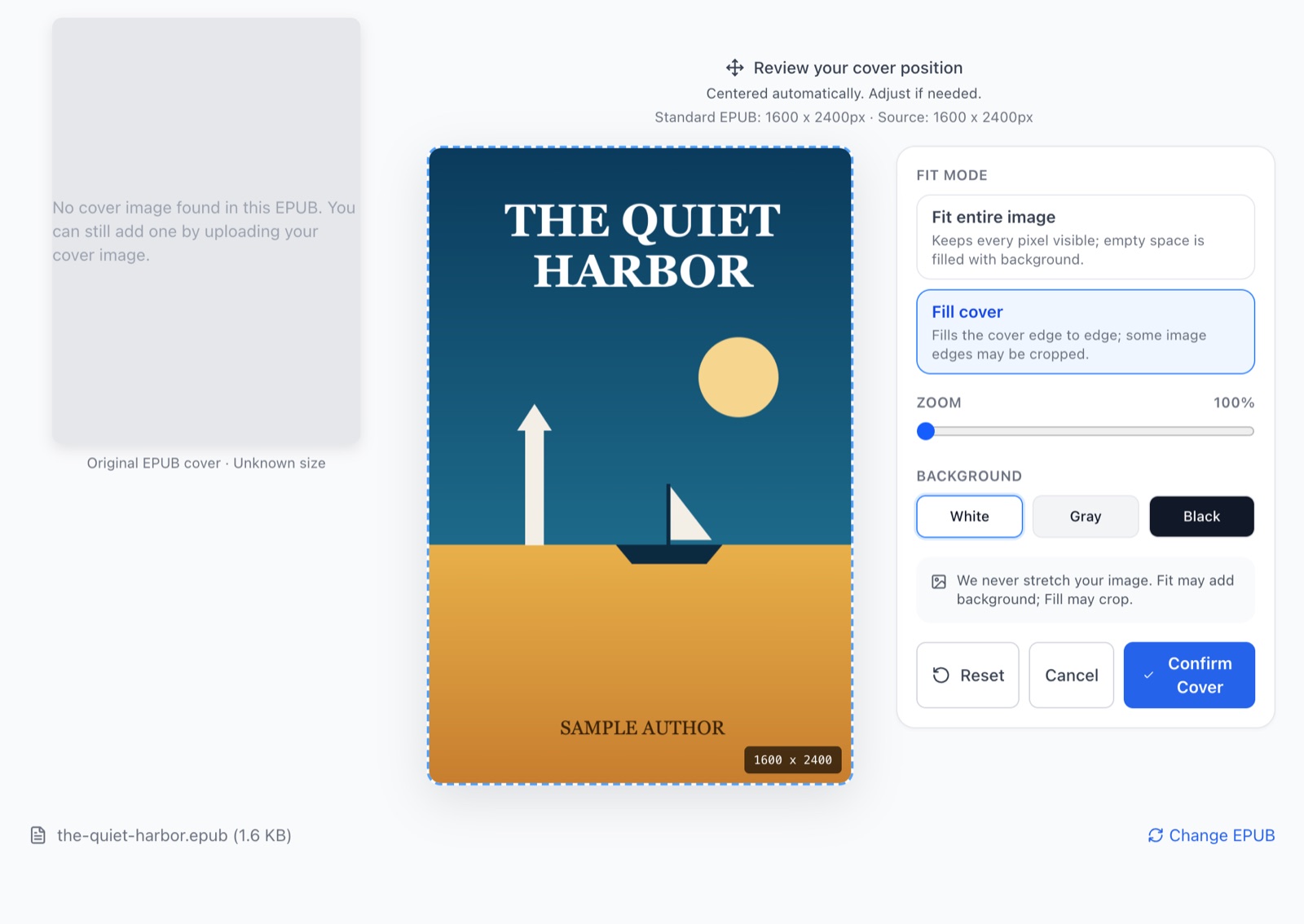
- Open EpubCoverChanger.com and click Upload EPUB. If the book has no cover, you'll see: "No cover image found in this EPUB. You can still add one by uploading your cover image."
- Click Upload New Cover and choose a JPG, PNG or WebP image (up to 10 MB).
- Pick an output size. Amazon Kindle KDP (1600 x 2560) is a safe choice for any reader. See the size table below.
- Choose Fit entire image to keep the whole picture, orFill cover to cover the page edge to edge (the edges may be cropped).
- Click Download Updated EPUB. The new file is saved with
-new-coveradded to its name, and your original file is not changed.
Add a cover on iPhone or Android
- Open epubcoverchanger.com in Safari (iPhone) or Chrome (Android).
- Tap Upload EPUB and pick the book from Files or Downloads.
- Tap Upload New Cover and choose a photo or a saved image.
- Tap Download Updated EPUB. On iPhone, tap Save or Open EPUB, then choose Save to Files or open it in Apple Books. On Android, the file goes to Downloads.
What the tool changes inside your EPUB
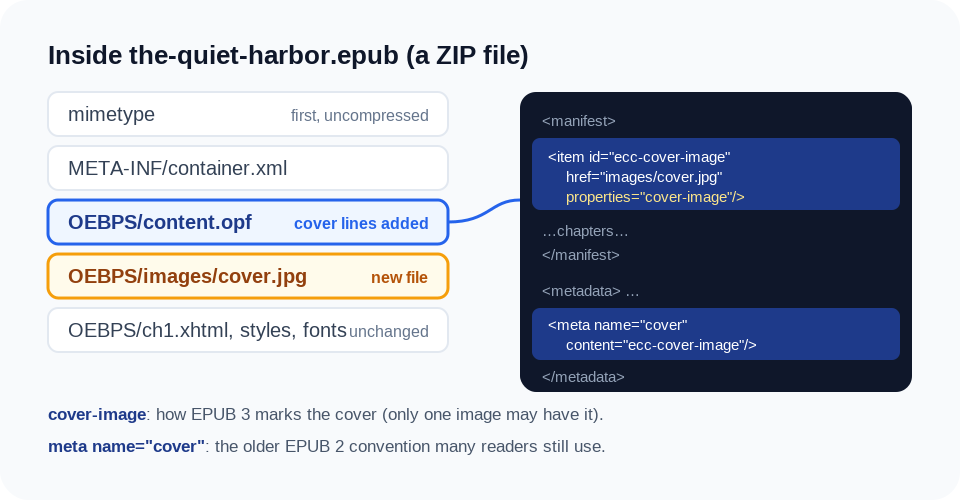
A cover only shows up when the book says which image is the cover. Here is exactly what gets written, so you know nothing else is touched:
| Change | Why it matters |
|---|---|
Image saved as images/cover.jpg | JPEG opens in every reading app |
| Image listed in the manifest | Readers ignore files that are not listed |
properties="cover-image" (EPUB 3 books) | The EPUB 3 way to mark the cover; only one image may carry it[1] |
<meta name="cover"> | The older EPUB 2 convention that many readers and converters still look for |
mimetype kept first and uncompressed | Required by the EPUB standard[6]; strict readers reject files that break it |
Chapters, styles, fonts and the title and author stay as they were; only the book's last-modified date is updated. The tool does not insert an extra cover page at the start of the book. The cover appears as the book's thumbnail in your library. Some apps also show it as the first page, and others don't.
What size should the cover be?
| Where you read | Size |
|---|---|
| Kindle (via Send to Kindle) | 1600 x 2560 px, Amazon KDP's ideal[5] |
| Apple Books, Google Play Books | 1600 x 2400 px (2:3) |
| Kobo | 1500 x 2000 px (3:4) matches its screens |
| Not sure | 1600 x 2560 px works almost everywhere |
Sources and minimums for each platform are in our EPUB cover size guide. Use the largest original image you have. Enlarging a small image makes the file bigger without adding detail.
Other ways to add a cover
calibre
calibre is a free desktop e-book manager. Select the book, click Edit metadata (or press E), and set the cover from a file on your computer, or by dropping an image onto the cover area[3]. calibre works on its own copy of the book and leaves your original file untouched[4]. Export the book from calibre afterwards, then check that the cover shows in your reading app. calibre is a good choice if you already manage your library with it. For a single book, the browser tool is quicker.
By hand (for the curious)
An EPUB is a ZIP file. You can add a cover yourself if you are comfortable editing XML:
- Make a copy of the book and rename it from .epub to .zip.
- Find the package file (usually
content.opf;META-INF/container.xmlsays where it is) and put your image in the same folder or a subfolder. - Add the image to the manifest and point the cover meta at it:
<manifest>
  <item id="cover-img" href="images/cover.jpg"
        media-type="image/jpeg" properties="cover-image"/>
  ...
</manifest>

<metadata>
  ...
  <meta name="cover" content="cover-img"/>
</metadata>
Leave out properties="cover-image" if the package says version="2.0". The catch is re-zipping: the mimetype file must be the first entry and stored without compression[6]. Most zip tools don't do this by default, which is a common reason a hand-edited EPUB stops opening.
Cover still not showing?
- Delete the old copy first. Libraries and devices often keep the old thumbnail. Remove the original book, then add the new file.
- On Kindle, re-send the file with Send to Kindle. Copying an EPUB over USB does not work on Kindle. See fixing missing covers on Kindle and how to send an EPUB to Kindle.
- Check for DRM. DRM-protected books cannot be edited, and the tool will tell you if it finds DRM.
- Title or author looks wrong too? Fix it with the EPUB metadata editor.
FAQ
Can I add a cover to an EPUB without calibre?
Yes. EpubCoverChanger.com adds the cover in your browser, so there is nothing to install and the book is never uploaded. It works on Windows, Mac, iPhone and Android.
Is it free?
Yes. Adding or changing the cover of a single EPUB is free, with no watermark and no account.
Does adding a cover change the text of my book?
No. Only the cover image and the package file that lists it are changed. Chapters, styles and fonts stay exactly as they were.
What image size should I use for an EPUB cover?
1600 x 2560 pixels is Amazon KDP's ideal size and works almost everywhere. 1600 x 2400 (2:3) suits Apple Books and Google Play. Start from the largest image you have.
Which image formats can I use?
JPG, PNG or WebP, up to 10 MB. When a book has no cover yet, the tool saves the new cover as a JPEG, the format every reading app supports.
Can I add a cover to a book I bought?
Usually not. Store-bought books are normally DRM-protected, and no tool should edit them. DRM-free EPUBs, such as your own files, fanfiction downloads or public-domain books, work.
Add your cover now
Free, in your browser, on desktop or phone. Your book is never uploaded.
Add a cover to your EPUB